For your people
Welcome. Getting started takes a few minutes.
If your church or organization sent you here, they use Ganeeden to help you pray, read Scripture and stay connected. The app is free for you, always.
Three steps
- 1
Download the app
Search for "Ganeeden" in the App Store on iPhone, or Google Play on Android. Then create your account.
- 2
Connect to your organization
Open the invitation link your church or organization shared with you. No link? Search for your organization by name in the app and ask to join.
- 3
You're in
Once someone at your organization welcomes you, you'll see what they've shared, like a welcome message or a Scripture memory plan.
What's in the app
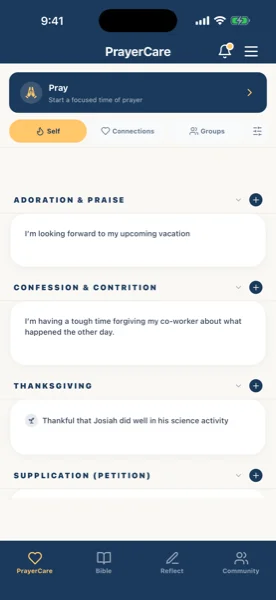
PrayerCare
Keep your prayer requests, pray for others, and record how God answers. Each request stays private until you choose who sees it.
Growth
Read the Bible, memorize Scripture and keep a private journal.
Community
Stay connected with people and groups at your organization, and share stories of what God is doing.
Your prayers and journal are yours.
Only the people you choose can see what you share. Your pastor and your organization's leaders have no special access to your prayers or your journal.
Private entries are encrypted on your phone. We're a Canadian company and follow PIPEDA, Canada's privacy law.
Found Ganeeden on your own?
You're welcome to download the app and start. If your church or organization joins later, you can connect then.